
AI Tools overview and credit usage
Understand the four AI-powered features in Chamevo — background removal, upscaling, text-to-image, and Virtual Try-On — and how AI credits work.
Updated April 28, 20265 min read
Chamevo includes four AI-powered features that help customers create better designs and preview their products on real models. Each feature uses AI credits from your subscription plan.
The four AI features
| Feature | What it does | Where customers find it |
|---|---|---|
| Background Removal | Removes the background from uploaded images automatically | Edit Image tab in the toolbar |
| Image Upscaling | Enhances low-resolution images to meet print quality requirements | DPI warning notification on the canvas |
| Text-to-Image | Generates images from text descriptions | Text to Images tab in the Images module |
| Virtual Try-On | Shows the customer's design on a model wearing the product | Action bar button in the product customizer |
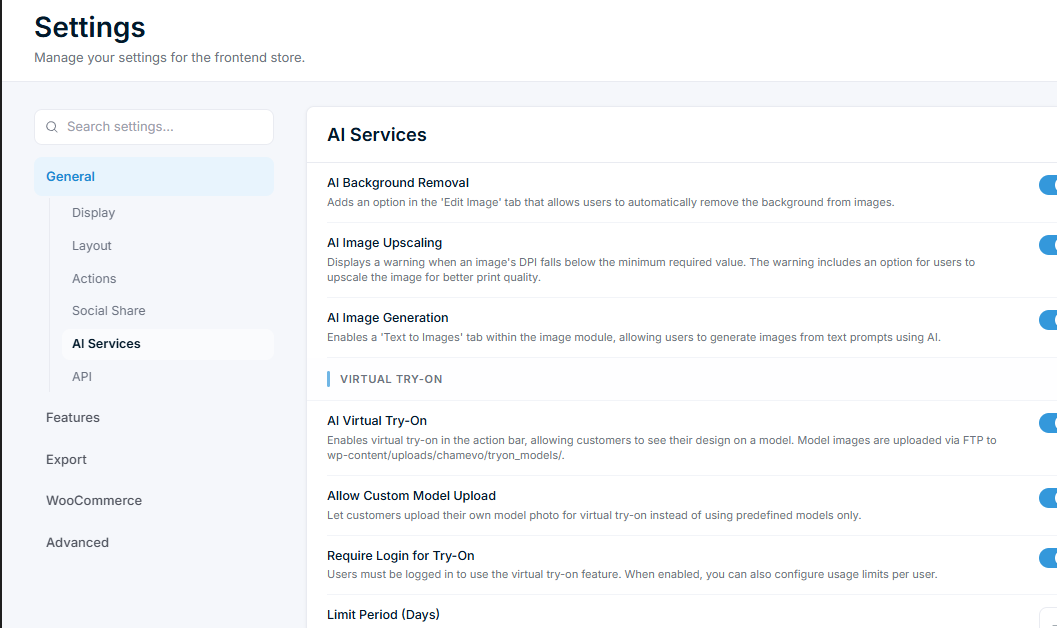
All four features are optional and disabled by default. You enable each one individually in Chamevo → Settings → General → AI Services — toggle on the features you want to offer and save. Each feature can be turned on or off independently, so you can offer background removal without text-to-image, or Virtual Try-On without upscaling — whatever combination suits your store.
How AI credits work
Related articles
Remove image backgrounds with AIEnable AI background removal so customers can remove backgrounds from uploaded images directly in the product customizer.Upscale low-resolution images with AIEnable AI image upscaling to automatically warn customers about low-resolution uploads and offer one-click quality enhancement.Generate images from text promptsEnable AI text-to-image generation so customers can create images from text descriptions directly in the product customizer.Set up Virtual Try-On for your productsEnable Virtual Try-On so customers can see their customized design on a model wearing the product, with image and video generation.