
Remove image backgrounds with AI
Enable AI background removal so customers can remove backgrounds from uploaded images directly in the product customizer.
Updated April 28, 20265 min read
AI Background Removal lets customers strip the background from uploaded images with one click. The result is a clean, transparent-background image ready for placement on any product surface. This is especially useful for apparel and custom merchandise where customers upload photos.
Before you start
- Your subscription must include AI credits. Background removal costs 5 credits per image.
- You need access to Chamevo → Settings in your WordPress admin.
Enable background removal
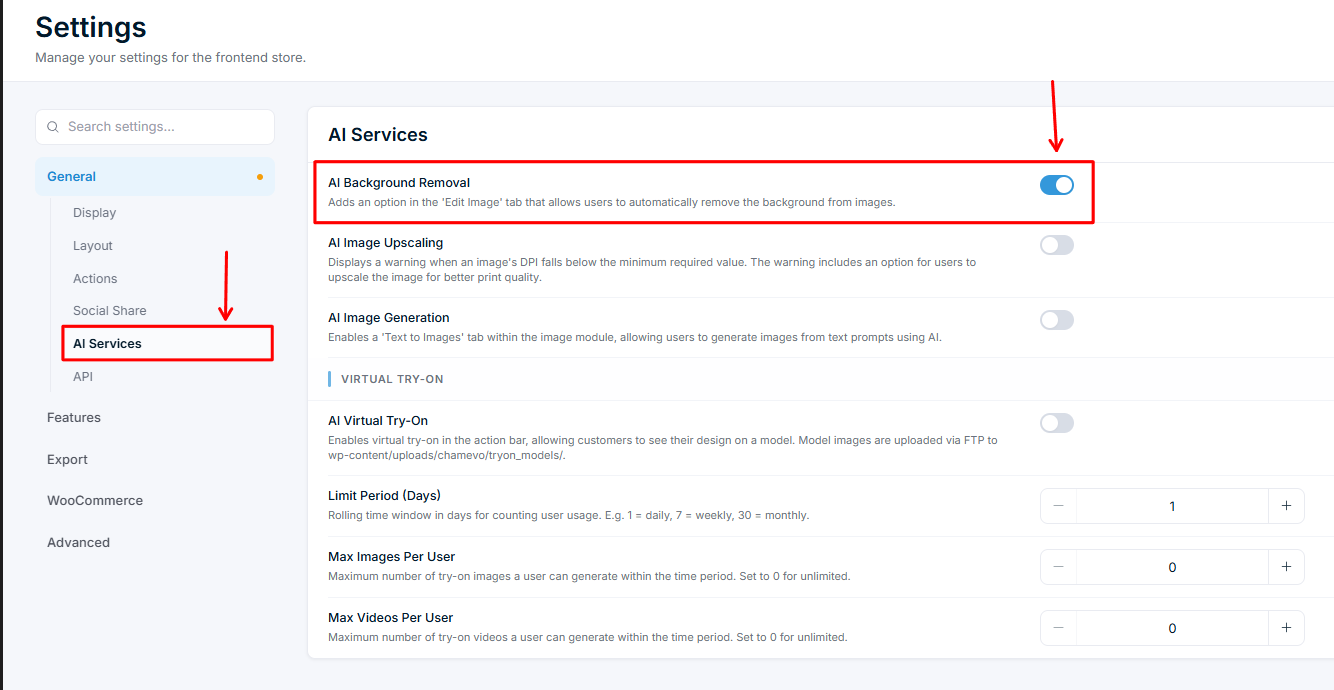
- Go to Chamevo → Settings in your WordPress admin.
- Navigate to the General tab, then the AI Services section.
- Toggle on AI Background Removal.
- Save your settings.
How customers use it
- The customer uploads an image (photo, logo, or illustration) in the product customizer.
- The customer selects the uploaded image on the canvas.
- In the toolbar, the customer opens the Edit Image options.
- The customer clicks the Remove Background button.
- The AI processes the image (typically 2–5 seconds). A loading indicator appears during processing.
- The background is removed and the image updates on the canvas with a transparent background.
The original image is replaced by the background-removed version. The customer can undo the action using the undo button if they prefer the original.
What works well
Background removal produces the best results with:
- People and portraits — clean separation between the person and the background.
- Product photos — isolated objects on contrasting backgrounds.
- Logos on solid backgrounds — especially when the logo has clear edges.
- Pet photos — generally good separation, though fine fur details may lose some precision.
What to set expectations for
The AI handles most images well, but certain scenarios produce imperfect results:
| Scenario | Typical result |
|---|
Related articles
AI Tools overview and credit usageUnderstand the four AI-powered features in Chamevo — background removal, upscaling, text-to-image, and Virtual Try-On — and how AI credits work.Upscale low-resolution images with AIEnable AI image upscaling to automatically warn customers about low-resolution uploads and offer one-click quality enhancement.Generate images from text promptsEnable AI text-to-image generation so customers can create images from text descriptions directly in the product customizer.Set up Virtual Try-On for your productsEnable Virtual Try-On so customers can see their customized design on a model wearing the product, with image and video generation.