
Generate images from text prompts
Enable AI text-to-image generation so customers can create images from text descriptions directly in the product customizer.
AI Image Generation lets customers create images from text descriptions. The customer types a prompt (like "sunset over mountains" or "abstract geometric pattern"), and the AI generates image options they can place directly on their product design. This is useful for stores that sell custom merchandise, gifts, or novelty products.
Before you start
- Your subscription must include AI credits. Text-to-image generation costs 2 credits per prompt — 1 credit per image, and each prompt produces 2 image options.
- You need access to Chamevo → Settings in your WordPress admin.
Enable text-to-image generation
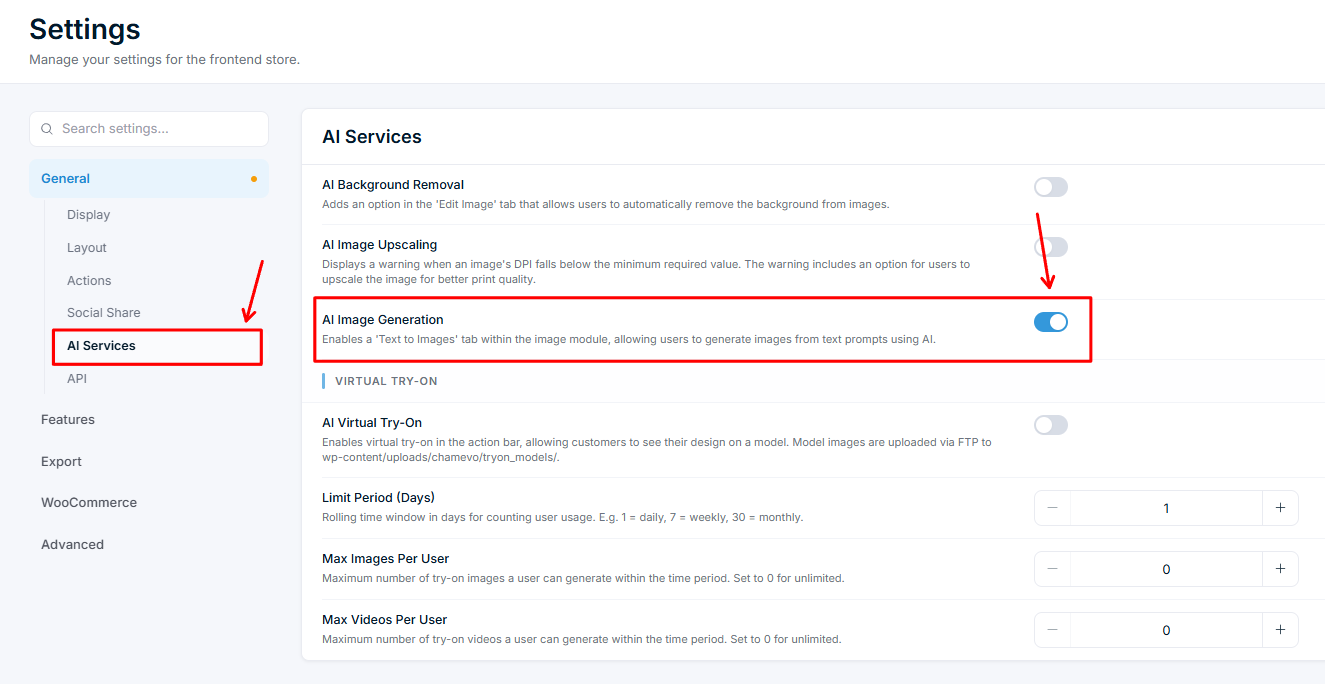
- Go to Chamevo → Settings in your WordPress admin.
- Navigate to the General tab, then the AI Services section.
- Toggle on AI Image Generation.
- Save your settings.
How customers use it
- The customer opens the Images module in the product customizer.
- The customer clicks the Text to Images tab (shown with a sparkle icon).
- The customer types a text description of the image they want (up to 500 characters).
- The customer clicks Generate.
- The AI generates 2 image options (typically takes 5–15 seconds). A loading indicator appears during processing.
- The customer clicks on their preferred image to place it on the canvas.
Generated images are stored locally in the customer's browser session. They remain available while the customer works on their design but are not saved permanently unless the customer saves their design.
Writing effective prompts
The quality of the generated image depends heavily on the prompt. Here are guidelines you can share with your customers:
| Approach | Example prompt | Result quality |
|---|---|---|
| Specific and descriptive |