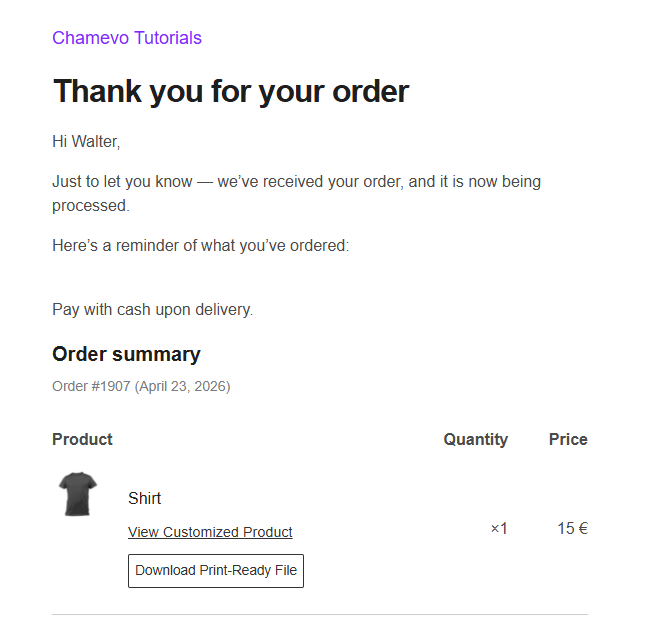
Configure order settings for customized products
Control how customization data appears in WooCommerce orders, customer account pages, and order confirmation emails.
Control how customization data appears in WooCommerce orders, customer account pages, and order confirmation emails. You can show design thumbnails, customization details, a link to view the finished product, and allow customers to edit their order before fulfillment.
Before you start
- Chamevo and WooCommerce are active and connected. See Connect your WooCommerce store to Chamevo.
Order settings
Go to Chamevo → Settings → WooCommerce → Order.
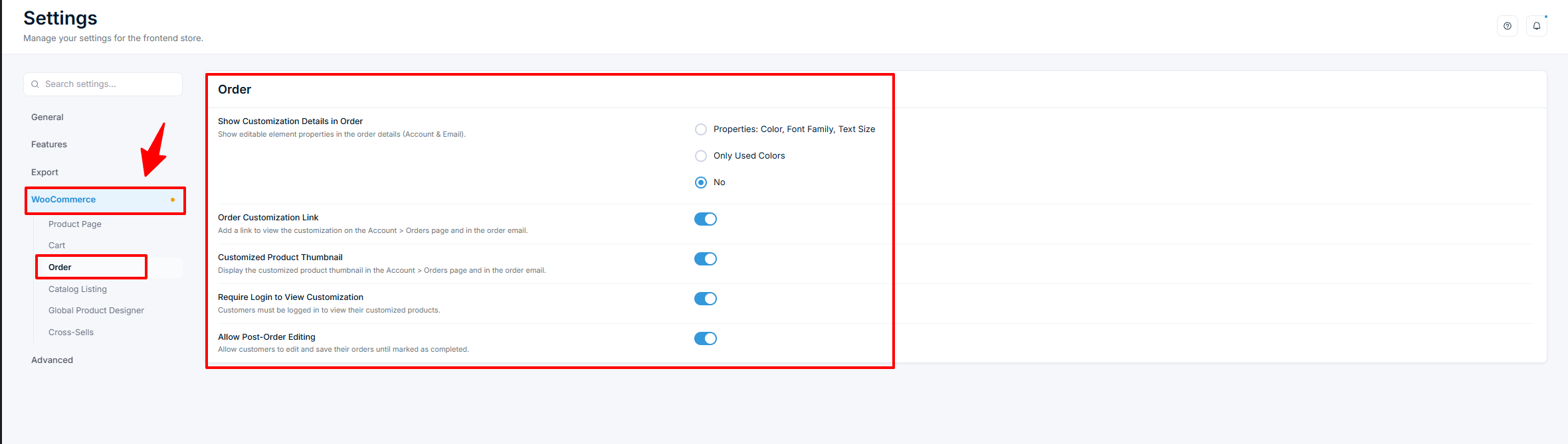
Show Customization Details in Order
Controls what customization properties appear in the order details on the customer's My Account → Orders page and in order confirmation emails.
| Option | What it shows |
|---|---|
| Properties | Color swatches, font family, and text size for each editable element |
| Only Used Colors | Color swatches only |
| No (default) | No customization details |
Order Customization Link
Default: On
Adds a "View Customized Product" link to the order details on the My Account → Orders page and in the order email. When clicked, the link opens the product page with the customer's design loaded in the product customizer.
If the WooCommerce product is set as downloadable and the order is paid, a Download button also appears so customers can download their design as a print-ready file.