
Let vendors sell customizable products with Dokan
Configure the Dokan marketplace plugin so vendors can create and manage their own customizable products with Chamevo.
The Dokan integration lets marketplace vendors create and sell customizable products through your WooCommerce store. Vendors access the Chamevo admin (Products and Product Builder) to create their own products, while you control which shared design assets are available to all vendors.
This is useful for multi-vendor marketplaces where each vendor offers personalized products — for example, a print-on-demand marketplace where vendors design their own product templates.
Before you start
- Dokan must be installed and active (any license tier).
- WooCommerce must be installed and active.
- Chamevo must be installed and active.
- Vendors must have the WordPress "Seller" role (assigned by Dokan).
Step 1: Configure Dokan admin access
Dokan must allow vendors to access the WordPress admin. This is required because Chamevo''s product management tools (Products, Product Builder) are in the WordPress admin area.
- Go to Dokan → Settings → General in your WordPress admin.
- Find the Admin area access option.
- Uncheck (disable) this option so vendors can access the WordPress admin.
- Save settings.
If Admin area access remains enabled, Chamevo displays an error notice in the admin reminding you to disable it.
Step 2: Enable vendor access to Chamevo
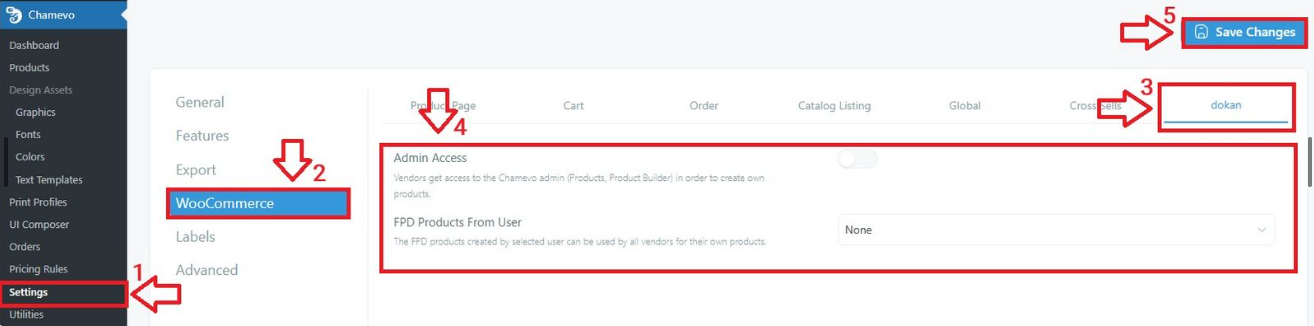
- Go to Chamevo → Settings in your WordPress admin.
- Open the WooCommerce tab.
- Click the Dokan section.
- Enable the Admin Access checkbox. This grants vendors (users with the Seller role) access to Chamevo''s Products and Product Builder pages.
- Save settings.
Shared product templates
By default, each vendor can only see and use their own Chamevo products. To let all vendors use a shared set of product templates:
- In the Dokan settings section, find Chamevo Products From User.
- Select a WordPress user from the dropdown.
- Save settings.
All Chamevo products created by the selected user become available to every vendor for use in their WooCommerce products. This is useful when you (the admin) create base product templates that vendors build upon.