
Set up Virtual Try-On for your products
Enable Virtual Try-On so customers can see their customized design on a model wearing the product, with image and video generation.
Updated April 28, 20265 min read
Virtual Try-On lets customers see their customized product design on a model. The customer selects a product view, picks a model (or uploads their own photo), and the AI generates a realistic image of the model wearing the product with the customer's design applied. Customers can also generate short videos from the try-on results.
This feature is ideal for apparel stores selling t-shirts, hoodies, dresses, or any wearable product.
Before you start
- Your subscription must include AI credits. Virtual Try-On images cost 15 credits each. Videos cost 20 credits each.
- You need access to Chamevo → Settings in your WordPress admin.
- Optionally, prepare custom model images if you want to provide branded models instead of using the default selection.
Step 1: Enable Virtual Try-On
- Go to Chamevo → Settings in your WordPress admin.
- Navigate to the General tab, then the AI Services section.
- Toggle on AI Virtual Try-On.
- Three additional settings appear:
- Allow Custom Model Upload (on by default) — lets customers upload their own photo as the model.
- Require Login for Try-On (off by default) — restricts the feature to logged-in users.
- Usage limit settings (appear when login is required).
- Save your settings.
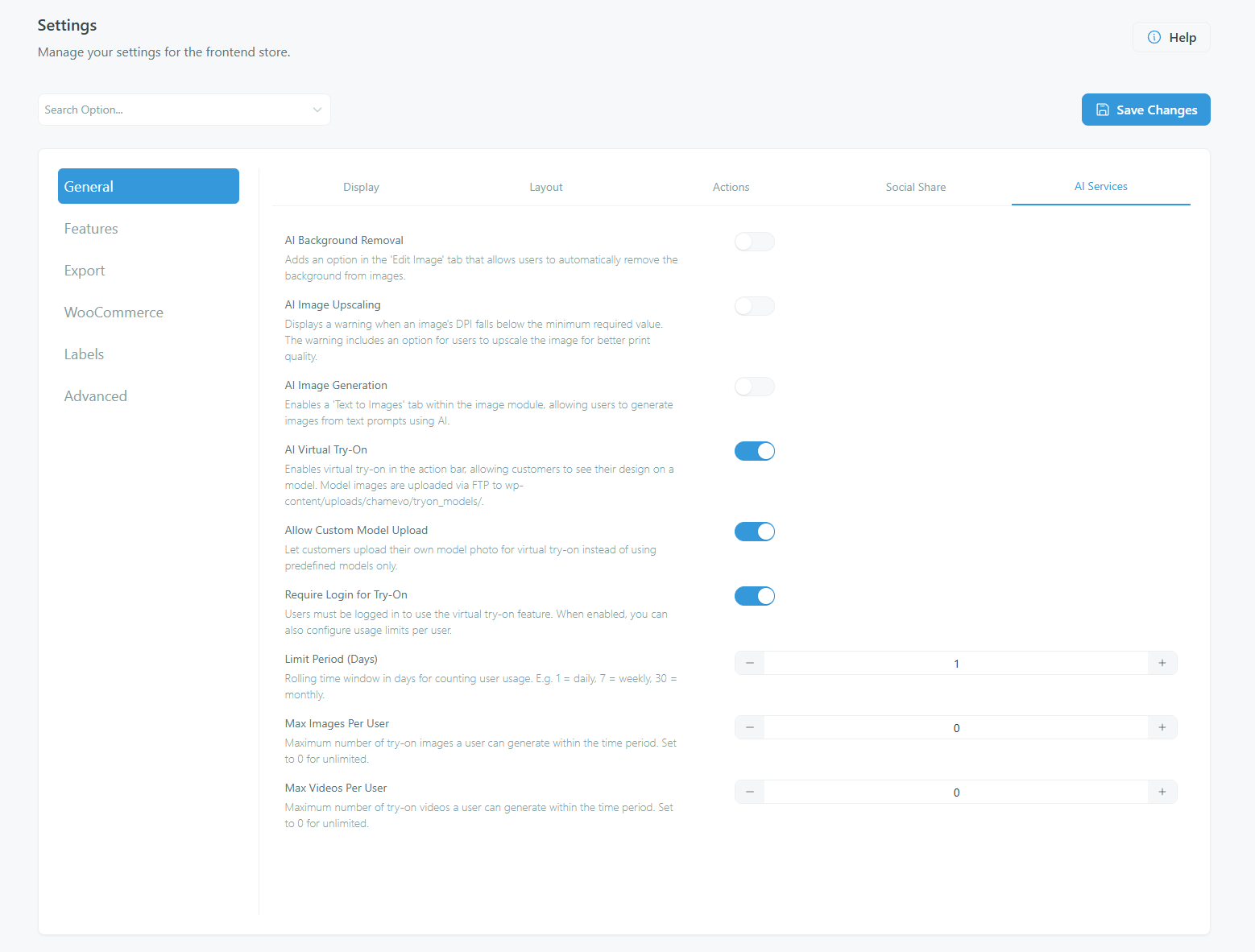
Step 2: Configure usage limits (optional)
If you enable Require Login for Try-On, you can set limits on how many try-on images and videos each user can generate:
| Setting | What it does | Default |
|---|---|---|
| Limit Period (Days) |
Related articles
AI Tools overview and credit usageUnderstand the four AI-powered features in Chamevo — background removal, upscaling, text-to-image, and Virtual Try-On — and how AI credits work.Remove image backgrounds with AIEnable AI background removal so customers can remove backgrounds from uploaded images directly in the product customizer.Upscale low-resolution images with AIEnable AI image upscaling to automatically warn customers about low-resolution uploads and offer one-click quality enhancement.Generate images from text promptsEnable AI text-to-image generation so customers can create images from text descriptions directly in the product customizer.