Den Produkt-Customizer auf jeder WordPress-Seite einbetten
Verwenden Sie die Shortcodes [chamevo] und [chamevo_form], um den Produkt-Customizer auf jeder WordPress-Seite oder jedem Beitrag anzuzeigen – mit oder ohne WooCommerce.
Sie können den Chamevo-Produkt-Customizer mit Shortcodes auf jeder WordPress-Seite oder jedem Beitrag einbetten. Das funktioniert mit oder ohne WooCommerce – verwenden Sie den Shortcode [chamevo], um den Customizer anzuzeigen, und [chamevo_form], um darunter ein einfaches Bestellformular hinzuzufügen.
Bevor Sie beginnen
- Sie benötigen mindestens ein Chamevo-Produkt, das im Product Builder erstellt wurde.
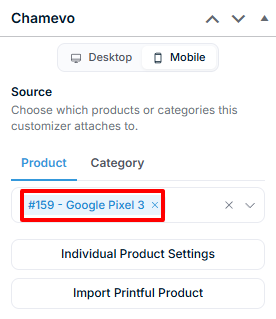
- Die Seite oder der Beitrag muss über die Chamevo-Metabox ein Chamevo-Produkt zugewiesen haben.
Den Customizer mit [chamevo] einbetten
- Erstellen oder bearbeiten Sie eine WordPress-Seite oder einen Beitrag.
- Wählen Sie in der Chamevo-Metabox (in der Seitenleiste oder unterhalb des Editors) das anzuzeigende Produkt aus.
- Fügen Sie den Shortcode an der Stelle ein, an der der Customizer erscheinen soll:
[chamevo]
- Veröffentlichen oder aktualisieren Sie die Seite.
Der Customizer wird im Frontend an der Position des Shortcodes geladen. Kunden können das Produkt personalisieren, und die Design-Daten werden erfasst, sobald sie über ein verbundenes Formular absenden (WooCommerce „In den Warenkorb“, [chamevo_form] oder Gravity Forms).
Der veraltete Shortcode [fpd] funktioniert ebenfalls und verhält sich identisch.
Ein Bestellformular mit [chamevo_form] hinzufügen
Für Seiten ohne WooCommerce verwenden Sie [chamevo_form], um ein integriertes Bestellformular mit Name, E-Mail und Absende-Button hinzuzufügen:
[chamevo]
[chamevo_form]
Das Formular erfasst Name und E-Mail-Adresse des Kunden, speichert die Design-Daten und sendet eine Bestellbenachrichtigung per E-Mail. Eine Preisanzeige aktualisiert sich in Echtzeit basierend auf der Preiskonfiguration des Produkts.