Preparing the latest guides, releases, and feature request updates.
Loading guides
Preparing the right Knowledge Base content for this platform.
Use pricing rule groups (first match vs. accumulate) | Chamevo Support Center
Use pricing rule groups (first match vs. accumulate)
Understand the difference between Any (first match) and All (summed) evaluation modes, and when to use each for tiered or stacking pricing.
Updated April 28, 20265 min read
Every pricing group uses one of two match types that control how conditions are evaluated. Choosing the right match type determines whether customers pay a single tier price or accumulate charges across multiple thresholds.
The two match types
Match type
Label in Pricing Rules Manager
Behavior
Any
Any (first match) — "first match wins"
Checks rules top to bottom. Applies the price from the first rule that matches, then stops. Like an if/else chain. Order matters
All
All (summed) — "Every matching rule is summed"
Checks every rule. Applies the price from every rule that matches and adds them together. Order does not matter
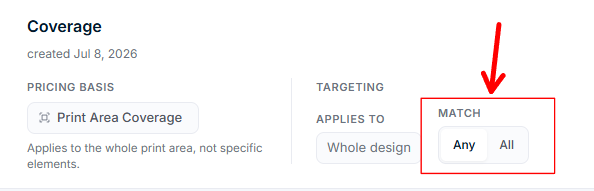
You set the match type when you create a pricing group, and you can change it later with the Match toggle (Any / All) in Chamevo → Pricing Rules.
Any (first match) — tiered pricing
Use Any (first match) when you want only one price tier to apply at a time. This is the most common choice.
Example: character-count tiers
A store charges extra for long text on personalized items:
With Any (first match), the system checks from top to bottom and stops at the first match:
Text typed
Characters
Checks
Result
"Hello"
5
Fails all 3
$0.00
"Happy Birthday"
13
Fails > 30, fails > 20, matches > 10 → stops
$1.50
"Happy Birthday to my best friend"
29
Fails > 30, matches > 20 → stops
$3.00
"Congratulations on your wonderful achievement today"
45
Matches > 30 → stops
$5.00
The customer pays only the single tier they fall into. A 45-character text pays $5.00, not $5.00 + $3.00 + $1.50.
Rule order matters
With Any (first match), conditions are checked top to bottom. Place the highest threshold first.
Correct order:
Greater than 30 → $5.00
Greater than 20 → $3.00
Greater than 10 → $1.50
Wrong order:
Greater than 10 → $1.50
Greater than 20 → $3.00
Greater than 30 → $5.00
With the wrong order, a 45-character text matches "> 10" first and only pays $1.50. The system never reaches the $5.00 rule.
All (summed) — stacking pricing
Use All (summed) when you want prices to accumulate. Every condition that matches adds its price.
Example: progressive color charges
A screen printing store charges per additional color:
Condition
Price
Greater than or equal to 4 colors
$3.00
Greater than or equal to 3 colors
$2.00
Greater than or equal to 2 colors
$1.00
With All (summed), every passing condition stacks:
Colors used
Matches
Total added
1
None
$0.00
2
>= 2
$1.00
3
>= 2, >= 3
$1.00 + $2.00 = $3.00
4
>= 2, >= 3, >= 4
$1.00 + $2.00 + $3.00 = $6.00
Each threshold adds its own surcharge on top of the others.
When All (summed) makes sense
Per-color pricing — each additional color adds to production cost
Progressive line charges — each additional line of engraving requires a separate machine pass
Cumulative element fees — each additional design element adds handling time
Choosing the right match type
Pricing goal
Match type
Why
Tiered pricing (customer falls into one tier)
Any (first match)
Only the applicable tier price applies
Per-unit surcharges (each unit adds cost)
All (summed)
Charges accumulate per threshold
Simple flat surcharge at a single threshold
Any (first match)
One condition, one price — either it matches or it does not
Escalating production costs
All (summed)
Each threshold represents an additional production step
If you are unsure, start with Any (first match). It is simpler to reason about and covers most use cases.
Multiple pricing groups on one product
A single Print Profile can have multiple pricing groups assigned. Each group evaluates independently.
Example: text tiers + color surcharges
Group
Property
Match type
Text length tiers
Text Length
Any (first match)
Color surcharges
Used Colours
All (summed)
If a customer types 25 characters using 3 colors:
Text Length group (Any (first match)): 25 characters matches "> 20" → $3.00
Colors group (All (summed)): 3 colors matches ">= 2" ($1.00) and ">= 3" ($2.00) → $3.00
Total from pricing rules: $6.00
The groups do not interfere with each other. Each evaluates its own property against its own conditions.
The Element Count property
The Element Count property counts how many elements are placed on the canvas across the whole design. It pairs well with both match types:
Any (first match) — charge a flat fee once the customer adds more than a threshold number of elements
All (summed) — charge progressively for each additional element
Example: extra element fee (Any (first match))
Condition
Price
Greater than 3 elements
$4.00
Greater than 1 element
$2.00
A customer with 2 elements pays $2.00. A customer with 5 elements pays $4.00 (not $6.00 — Any (first match) stops at the first match).
Maximum View Price
If you use All (summed) and prices can stack to high amounts, consider setting a cap. On the Print Profile's General tab, the Maximum View Price field limits the total pricing rule charges for a view. Set it to -1 to disable the cap.
This prevents unexpected totals when customers combine many elements, colors, and text on a single view.
Check your setup
Create a pricing group with Any (first match) and two or three tiered conditions.
Assign it to a Print Profile and open the product.
Test that only one tier applies at a time.
Change the match type to All (summed).
Test the same thresholds and verify that matching conditions stack.
Verify the total price makes sense for your production costs.
Q: Can I change the match type after creating a pricing group?
A: Yes. Open the pricing group, switch the Match toggle to Any or All, and click Save changes. The change takes effect for all products using that group.
Q: What happens if no conditions match?
A: No price is added from that group. The base product price remains unchanged.
Q: Can I mix Any (first match) and All (summed) groups on the same product?
A: Yes. Each pricing group has its own match type. A Print Profile can include groups with different match types, and they evaluate independently.
Q: Does the order of groups in the Print Profile matter?
A: No. Groups evaluate independently regardless of their order in the Print Profile's Pricing Rule Groups list. Only the order of conditions within a single Any (first match) group matters.