Assign a different product customizer for mobile visitors
Assign a simplified Chamevo product for mobile devices so mobile visitors get a faster, more focused customization experience.
Assign a different Chamevo product for mobile visitors. Use a simpler product layout with fewer elements and smaller images to give mobile customers a faster customization experience.
Before you start
- Chamevo and WooCommerce are active and connected. See Connect your WooCommerce store to Chamevo.
- You have at least two Chamevo products: one for desktop and one simplified version for mobile. See Create your first customizable product.
Why use a separate mobile product
70-80% of e-commerce traffic comes from mobile devices. A product with many elements, large images, and multiple views can be slow and difficult to use on small screens.
A simplified mobile product might:
- Use fewer views (front only instead of front + back)
- Have fewer elements on the canvas
- Use smaller background images for faster loading
- Limit the number of customizable options
How it works
The Chamevo meta box on each WooCommerce product supports separate product assignments for Desktop and Mobile. When a mobile visitor opens the product page, Chamevo loads the mobile-assigned product instead of the desktop version.
Mobile detection uses the browser's User-Agent string. Smartphones and mobile devices load the mobile product. Tablets and desktops load the desktop product.
Steps
1. Create a simplified mobile product
- Go to Chamevo → Products.
- Create a new product optimized for mobile — fewer views, fewer elements, smaller images.
- Save.
Alternatively, duplicate your desktop product and simplify the copy.
2. Assign the mobile product
- Go to Products (WooCommerce) in your WordPress admin.
- Open the WooCommerce product.
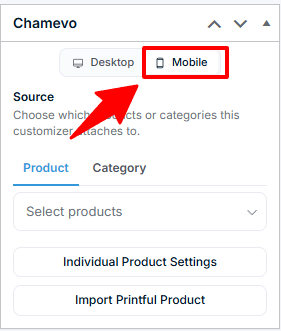
- In the Chamevo meta box, you have two source sections: Desktop and Mobile.
- In the Desktop section, assign your full desktop Chamevo product.
- In the Mobile section, set the source type and select your simplified mobile Chamevo product.
- Save.