
Let customers download print-ready files after purchase
Configure WooCommerce downloadable products so customers can download their customized design as a print-ready file after completing their order.
Let customers download their customized design as a print-ready file after they complete a purchase. This uses WooCommerce's built-in downloadable product feature combined with Chamevo's in-browser export.
Before you start
- Chamevo and WooCommerce are active and connected. See Connect your WooCommerce store to Chamevo.
- The WooCommerce product has a Chamevo product assigned. See Link a Chamevo product to a WooCommerce product.
How it works
When a WooCommerce product is marked as Downloadable, Chamevo adds a Download button on the order view page. After the customer pays and views their order, they can download the print-ready file directly from the product page.
The download is generated in the customer's browser using the product customizer's export engine. If a watermark image is configured, it is removed for the paid download.
Steps
1. Mark the WooCommerce product as downloadable
- Go to Products (WooCommerce) in your WordPress admin.
- Open the WooCommerce product linked to your Chamevo product.
- In the Product Data section, check the Downloadable checkbox.
- Save the product.
You do not need to add a downloadable file in WooCommerce's file list — Chamevo generates the file from the customer's design.

2. Configure watermark (optional)
If you want to add a watermark that appears in previews but is removed for paid downloads:
- Go to Chamevo → Settings → General → Actions → Download.
- In the Watermark Image field, enter the URL of your watermark image or use the media button to upload one.
- Save.
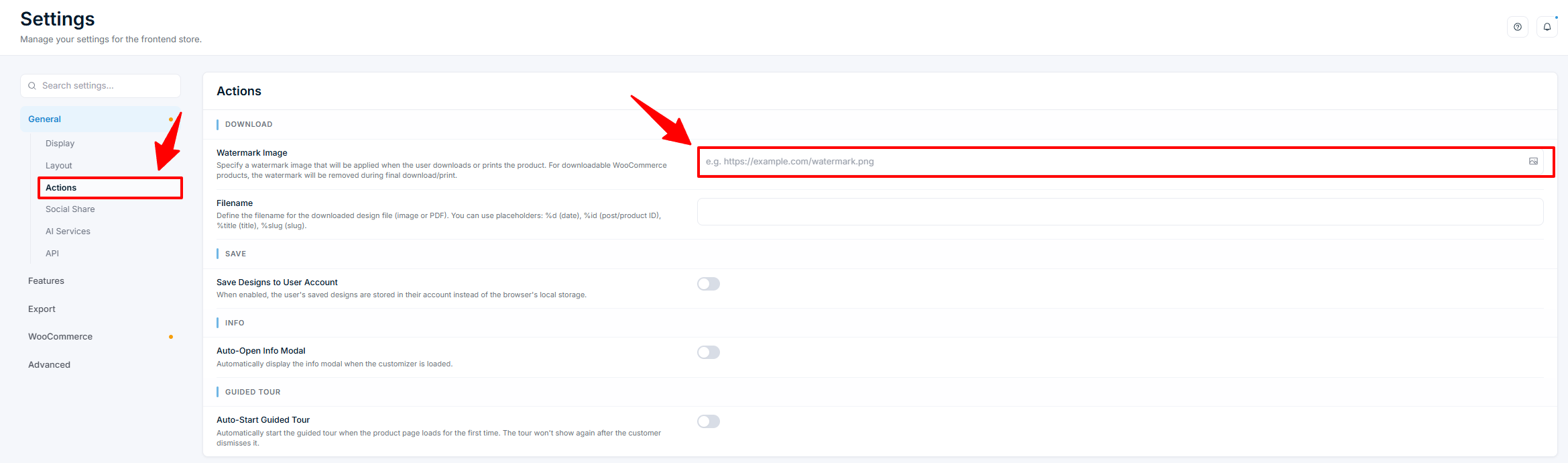
The watermark appears on the canvas when customers preview or download during customization. After they pay, the watermark is automatically removed when they access the design through their order.