Email print-ready files automatically
Configure how print-ready files are delivered via email — download links, attachments, and recipient settings by order source.
Updated April 28, 20265 min read
Chamevo can deliver print-ready files by email through download links or file attachments. Configure who receives the email, how the file is delivered, and when it is sent.
Before you start
- You have export settings configured in Chamevo > Settings > Export.
- Your WordPress site can send emails reliably. If you have delivery issues, install an SMTP plugin.
File receiving options
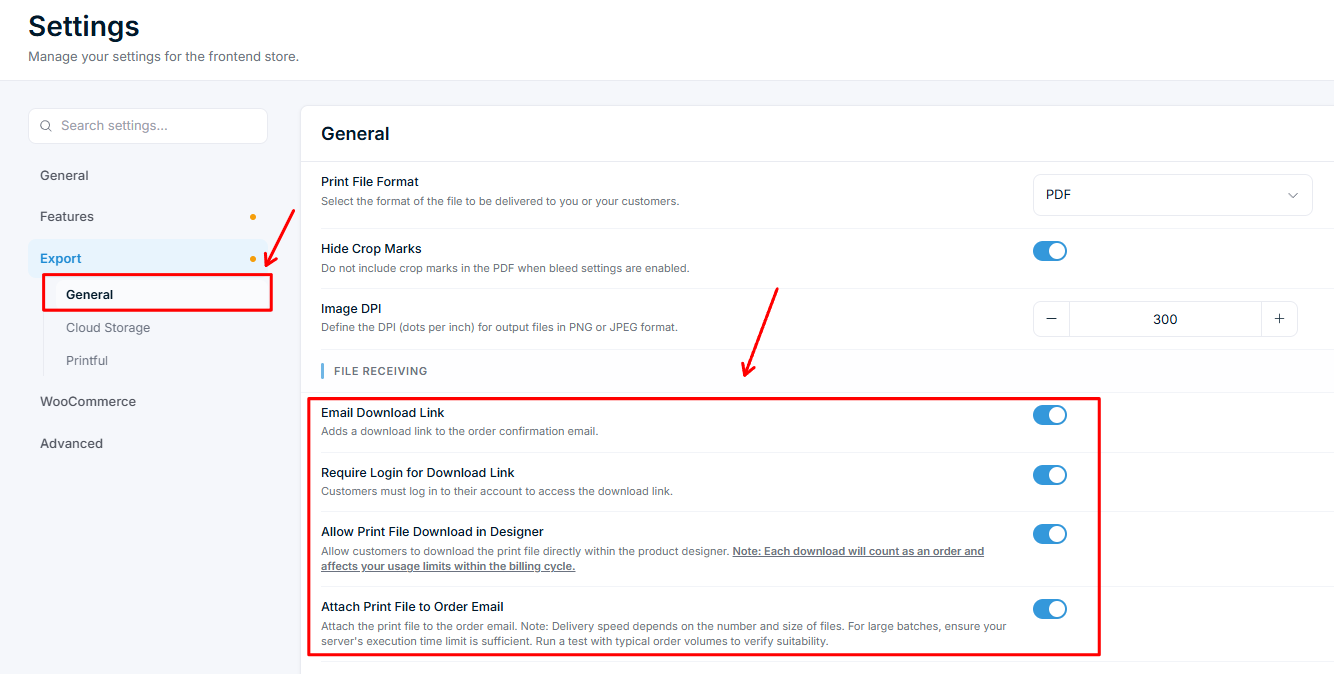
Go to Chamevo > Settings > Export. Under File Receiving, four email-related options are available:
| Option | Default | What it does |
|---|---|---|
| Email Download Link | On | Adds a download link to the order confirmation email |
| Require Login for Download Link | On | Customers must log in to access the link |
| Attach Print File to Order Email | Off | Attaches the file directly to the email |
| Allow Print File Download in Designer | Off | Lets customers download the file inside the product customizer. Each download counts as an order toward your usage limit |
You can enable multiple options at the same time.
Steps
Set up email download links (recommended)
- Go to Chamevo > Settings > Export.
- Enable Email Download Link.
- Optionally enable to require authentication before downloading. This is on by default for security.
Related articles
Print-Ready Exports overviewUnderstand how Chamevo generates print-ready files from customer designs, which formats are available, and how files reach your production workflow.Set up print profiles for your production workflowCreate print profiles to control file uploads, element behavior, color options, and module availability across products, views, and print areas.Configure bleed zones and output dimensionsSet up print areas with exact dimensions in millimeters, add bleed zones for trimming, and apply SVG masks for custom shapes.Prepare your setup for print-ready file generationVerify server requirements, fonts, file upload settings, and colorization before generating your first print-ready files.