Generate QR codes for products
How customers use the QR Code tab in the Images module to create and customize QR codes for their product designs.
Updated April 28, 20265 min read
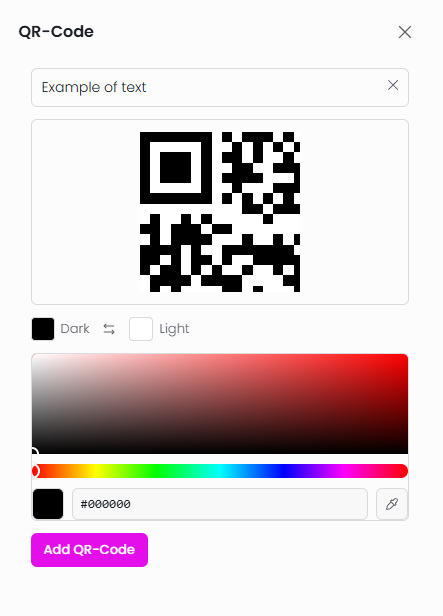
The QR Code tab in the Images module lets customers generate QR codes from any text or URL and add them to their product design. Customers can customize the dark and light colors of the QR code before placing it on the canvas.
QR codes are generated entirely in the browser as SVG images — no server processing or AI credits are needed.
Before you start
- The QR Code tab is available by default in the Images module. No activation is needed.
- QR code size, price, and canvas behavior are controlled in Chamevo → Settings → Features → QR Code (see below).
Configure QR codes in Settings
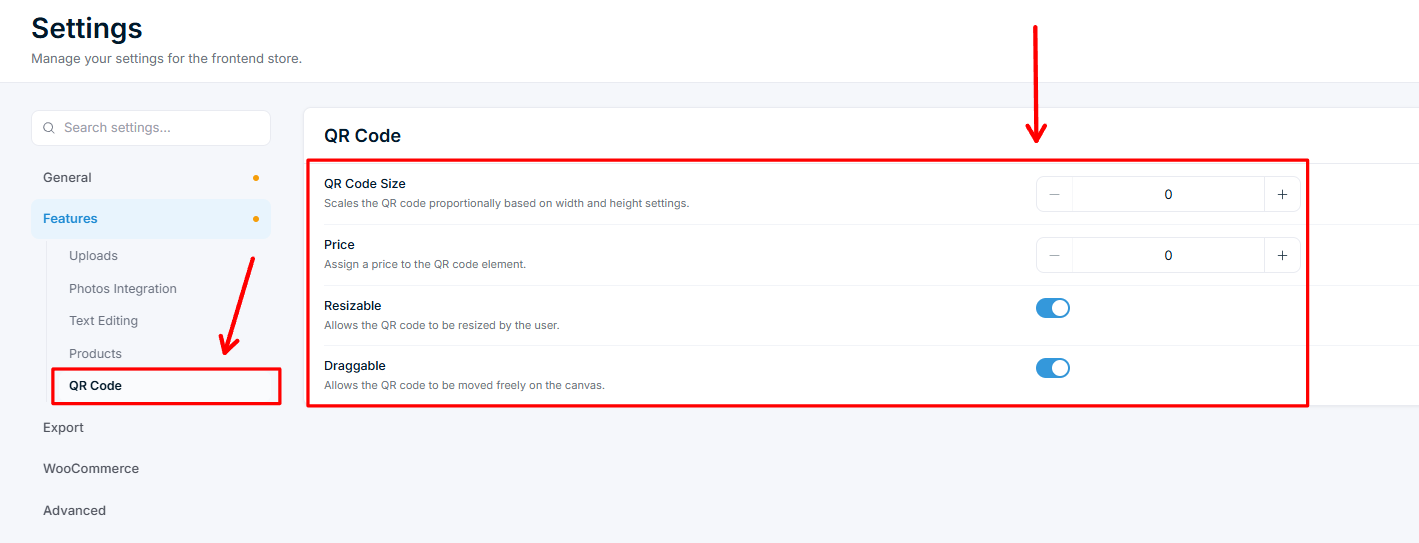
The QR Code tab works out of the box, but you can control how QR codes are added and behave from Chamevo → Settings → Features → QR Code:
| Setting | What it does |
|---|---|
| QR Code Size | Scales the QR code proportionally based on your width and height settings. |
| Price | Assigns a price to each QR code element the customer adds. |
| Resizable | Allows the customer to resize the QR code on the canvas. |
| Draggable | Allows the customer to move the QR code freely on the canvas. |
How customers use QR codes
- The customer opens the Images module and clicks the QR Code tab (identified by a QR icon).
- They type or paste text or a URL in the input field.
Related articles
Work with text elementsHow customers add and configure text elements in the product customizer, including text templates, character limits, and pricing.Work with image elementsHow the Images module works, including uploads, Pixabay, AI image generation, QR codes, and image pricing.Use the layers panel to manage element orderHow the Layers module lets customers view, reorder, edit, lock, hide, change colors, and delete design elements.Use Names & Numbers for group and team ordersSet up the Names & Numbers module so customers can submit a list of names and jersey numbers for group orders like sports teams or events.