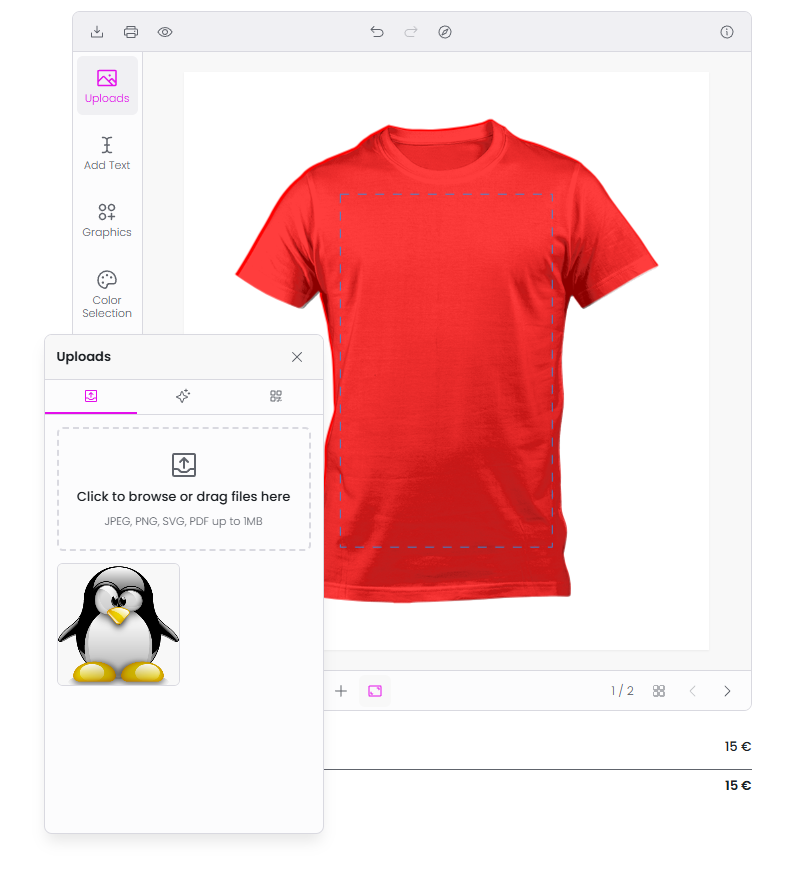
Work with image elements
How the Images module works, including uploads, Pixabay, AI image generation, QR codes, and image pricing.
Updated April 28, 20265 min read
The Images module is one of the default modules in the product customizer. It provides multiple ways for customers to add images to their design: file upload, Pixabay stock photos, AI image generation, and QR codes. Each source appears as a tab within the module.
Before you start
- The Images module is enabled by default. No activation is needed unless it was previously disabled.
- Image element settings (allowed file types, size limits, pricing) are configured in the Print Profile assigned to your product.
Image source tabs
The Images module shows up to four tabs. Each tab is a different image source:
| Tab | Icon | Requires | What it does |
|---|---|---|---|
| Upload | Upload tray | Always available | Customer uploads an image from their device |
| Pixabay | Pixabay logo | Pixabay API key | Customer searches and selects stock photos from Pixabay |
| Text to Images | Sparkle | AI Image Generation enabled + AI credits | Customer types a prompt and the AI generates images |
| QR Code | QR icon | Always available | Customer enters text or a URL and generates a QR code |
Related articles
Work with text elementsHow customers add and configure text elements in the product customizer, including text templates, character limits, and pricing.Use the layers panel to manage element orderHow the Layers module lets customers view, reorder, edit, lock, hide, change colors, and delete design elements.Use Names & Numbers for group and team ordersSet up the Names & Numbers module so customers can submit a list of names and jersey numbers for group orders like sports teams or events.Use Bulk Variations for multi-variant productsSet up the built-in Bulk Variations module so customers can order multiple size, color, or style combinations of a customized product in a single order.