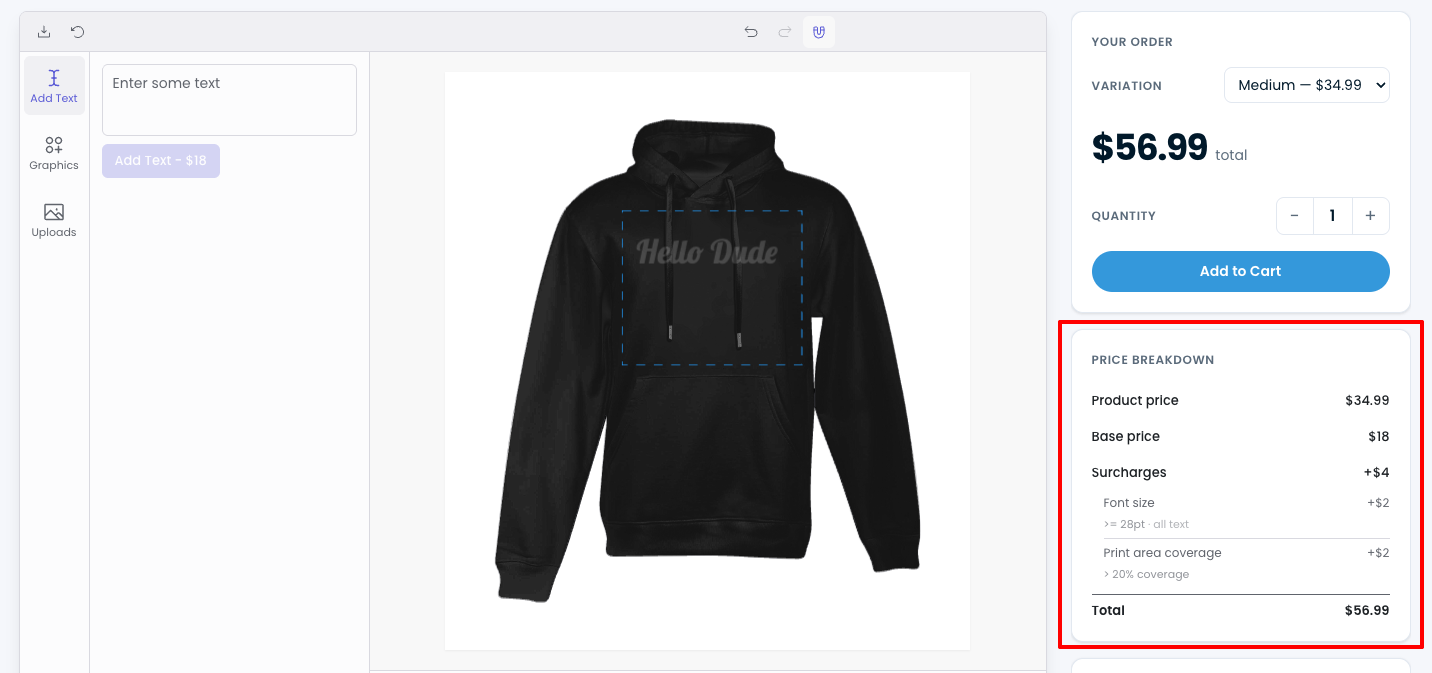
Live-Preisaufschlüsselung anzeigen
Verwenden Sie den Shortcode [chamevo_pricing_breakdown], um an beliebiger Stelle auf der Produktseite eine Live-Preisübersicht anzuzeigen – gesteuert durch Ihre Dynamic Pricing-Regeln.
Der Shortcode [chamevo_pricing_breakdown] rendert eine Live-Preisübersicht auf der Produktseite. Während Kunden das Produkt personalisieren – Text hinzufügen, Bilder hochladen, Farben auswählen – aktualisiert sich die Aufschlüsselung in Echtzeit und zeigt, wie der Endpreis berechnet wird.
Bevor Sie beginnen
- Sie benötigen mindestens eine konfigurierte Dynamic Pricing-Regel. Ohne Preisregeln hat die Aufschlüsselung nichts anzuzeigen. Richten Sie zunächst Preisregeln ein – siehe Dynamic Pricing-Übersicht.
- Der Produkt-Customizer muss auf derselben Seite vorhanden sein. Die Aufschlüsselung verbindet sich mit dem laufenden Customizer – sie funktioniert nicht eigenständig.
Was die Aufschlüsselung anzeigt
Die Preisaufschlüsselung listet jede aktive Preisregel als Posten mit dem aktuell berechneten Wert auf. Der Gesamtbetrag aktualisiert sich, wenn der Kunde Änderungen vornimmt.
Was in der Aufschlüsselung erscheint, hängt von Ihrer Preisregelkonfiguration ab. Typische Posten sind:
- Basisproduktpreis
- Textlängenzuschlag (wenn Sie pro Zeichen oder Zeile berechnen)
- Schriftgrößenzuschlag (wenn der Preis je nach Schriftgröße variiert)
- Bildgrößenzuschlag (wenn Sie basierend auf Upload-Abmessungen berechnen)
- Farbanzahlzuschlag (wenn Sie pro Anzahl verwendeter Farben berechnen)
- Elementpreise (feste Preise für bestimmte Designelemente)
Die Aufschlüsselung wird vollständig durch Ihre Dynamic Pricing-Regeln gesteuert. Wenn eine Regel aktiv ist und ihre Bedingung erfüllt ist, erscheint sie als Posten.
Shortcode hinzufügen
Der Shortcode hat keine Attribute:
[chamevo_pricing_breakdown]
Auf einer WooCommerce-Produktseite
Für WooCommerce-Produkte fügen Sie den Shortcode in das Feld Product short description ein, um ihn im Produktzusammenfassungsbereich zu platzieren:
- Öffnen Sie das Produkt unter WooCommerce → Products → Edit product.
- Fügen Sie
[chamevo_pricing_breakdown]in das Feld Product short description ein. - Aktualisieren Sie das Produkt.