Preparing the latest guides, releases, and feature request updates.
Loading guides
Preparing the right Knowledge Base content for this platform.
REST API endpoints (chamevo/v1) | Chamevo Support Center
REST API endpoints (chamevo/v1)
Reference for the Chamevo WordPress REST API — authentication, the response envelope, per-resource enable toggles, and every chamevo/v1 endpoint, including text templates and the color library.
Updated April 29, 20265 min read
Chamevo registers REST API endpoints under the chamevo/v1 namespace. Use these endpoints to manage products, views, categories, the design library, pricing rules, print profiles, UI layouts, fonts, text templates, the color library, settings, and orders programmatically — and to receive print-ready file notifications.
The same API powers the official Chamevo MCP server, so anything the MCP server can do is available to your own integrations.
Authentication
All chamevo/v1 endpoints require a Bearer token in the Authorization header.
Authorization: Bearer YOUR_API_TOKEN
Chamevo auto-generates a 64-character hexadecimal token and stores it in the chamevo_api_token WordPress option. To retrieve it in PHP:
$token = get_option('chamevo_api_token');
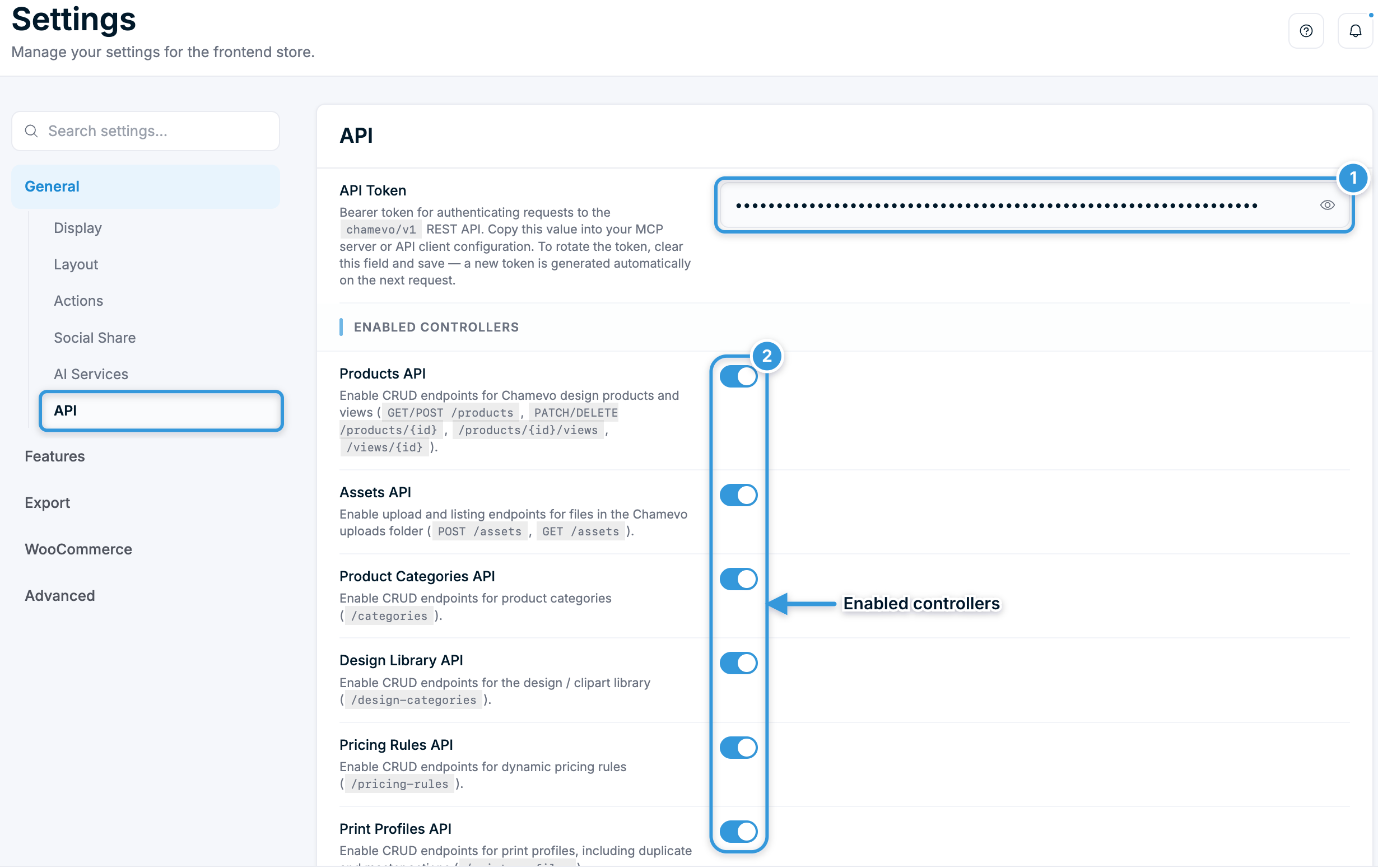
View or rotate your token in the admin
Go to Chamevo → Settings → API. The API Token field displays the current token. The field is read-only — copy the value from there into your API client or MCP server configuration.
To rotate the token, clear the API Token field and save. Chamevo generates a new token automatically on the next API request. Any client using the old token must be updated.
Conflict — for example, a product category with the same name already exists
422
The operation failed validation server-side
500
Unexpected server error
Enable or disable endpoints per resource
Go to Chamevo → Settings → API to toggle each resource group independently under Enabled Controllers. Every group ships enabled by default. A group is only disabled when you explicitly uncheck it and save.
Toggle (Settings → API)
Controls
Setting key
Products API
/products, /views
chamevo_api_products_enabled
Assets API
/assets
chamevo_api_assets_enabled
Product Categories API
/categories
chamevo_api_categories_enabled
Design Library API
/design-categories
chamevo_api_design_categories_enabled
Pricing Rules API
/pricing-rules
chamevo_api_pricing_rules_enabled
Print Profiles API
/print-profiles
chamevo_api_print_profiles_enabled
User Interfaces API
/user-interfaces
chamevo_api_user_interfaces_enabled
Shortcode Orders API
/shortcode-orders
chamevo_api_shortcode_orders_enabled
Print Jobs API
/print-jobs
chamevo_api_print_jobs_enabled
Settings API
/settings
chamevo_api_settings_enabled
Fonts API
/fonts
chamevo_api_fonts_enabled
Text Templates API
/text-templates
chamevo_api_text_templates_enabled
Color Library API
/color-library
chamevo_api_color_library_enabled
Three endpoint groups are always active and have no toggle: Orders (/orders/{id}), Export (the print job webhook), and System (/system). They are required for core export and discovery workflows.
When a resource is disabled, its routes are not registered. Requests to them return WordPress's standard 404 for unknown routes.
Base URL
https://yoursite.com/wp-json/chamevo/v1/
Retrieve it in PHP:
$base = rest_url('chamevo/v1/');
Products endpoints
Requires: Products API enabled in Settings → API.
GET /chamevo/v1/products
List products with optional pagination, search, and category filtering.
PATCH /views/{id} body: send any of title, thumbnail, options, elements, or product_id (move the view to a different product). At least one field is required.
Assets endpoints
Requires: Assets API enabled in Settings → API.
GET /chamevo/v1/assets
List uploaded assets in the Chamevo uploads folder, paginated and sorted newest first.
Parameter
Type
Default
Description
page
integer
1
Page number
limit
integer
20
Results per page (1–100)
POST /chamevo/v1/assets
Upload an image (PNG, JPEG, SVG) or PDF to the Chamevo uploads folder.
Request: Multipart form-data with a file field.
The upload applies the same security pipeline as the standard AJAX upload handler: MIME-type validation, finfo verification to prevent extension spoofing, image re-encoding to strip embedded payloads, EXIF orientation correction for JPEG files, SVG sanitization, and StorageManager push (uploads to S3 or Dropbox if configured).
The maximum file size is controlled by Maximum Image Size in the print profile upload settings (default 10 MB).
Requires: Product Categories API enabled in Settings → API.
Product categories group the design products in your catalog.
Method
Route
Description
GET
/categories
List categories. ?include_products=true adds the assigned product IDs (default false).
POST
/categories
Create a category. Body: { "title": "Apparel" }.
GET
/categories/{id}
Single category. ?include_products defaults to true here.
PATCH
/categories/{id}
Rename ({ "title": "..." }) or set assigned products ({ "products": [1,2,3] }).
DELETE
/categories/{id}
Delete a category.
POST
/categories/{id}/clear
Remove all products from a category, keeping the category itself.
Category names must be unique. Creating or renaming a category to a title another category already has returns 409 — the check ignores case and surrounding spaces.
Requires: Design Library API enabled in Settings → API.
Design categories are the nested clipart/graphics library customers drop onto products. Each category holds an options blob, a thumbnail, an ordered designs array, and an optional parent_id for nesting (0 = root).
Update any of title, options, thumbnail, parent_id, designs, order.
DELETE
/design-categories/{id}
Delete a design category.
A category cannot be set as its own parent, and a non-existent parent_id returns 400.
Fonts endpoints
Requires: Fonts API enabled in Settings → API.
Manages the custom TTF fonts available to the product customizer. Fonts live in wp-content/uploads/chamevo/fonts/. A font family is a base file (for example Lobster.ttf) plus optional __bold, __italic, and __bolditalic variant files.
Method
Route
Description
GET
/fonts
List font families and their variant URLs.
POST
/fonts
Upload a TTF. Multipart fields: file (required), name (optional family name).
DELETE
/fonts/{name}
Delete a font family and all of its variants.
Only .ttf files are accepted. Uploading a file with an existing family name replaces it.
Requires: Text Templates API enabled in Settings → API.
Text templates are the ready-made text presets customers add to a product (for example "Your Name Here"). They are stored as one ordered list without IDs, so a template is addressed by its position ({index}, starting at 0). Positions shift when you create or delete a template — re-read the list afterwards.
Method
Route
Description
GET
/text-templates
List all templates. Returns meta.total.
POST
/text-templates
Append a template.
PUT
/text-templates
Replace the whole list (reorder or bulk import). Body: { "templates": [ ... ] }. Templates you omit are removed.
GET
/text-templates/{index}
Single template.
PATCH
/text-templates/{index}
Update the fields you send.
DELETE
/text-templates/{index}
Delete a template. Later templates move up one position.
Use this endpoint instead of /settings: the storefront reads the stored list in a specific shape, so /settings rejects the chamevo_text_templates key.
Color Library endpoints
Requires: Color Library API enabled in Settings → API.
The color library holds your named colors and the palettes built from them. It is shared by the product customizer, print profiles, and pricing.
Method
Route
Description
GET
/color-library
The current library. meta.persisted is false until the library has been saved once — until then it is derived from your older color settings.
PUT
/color-library
Validate and save the whole library. Send the model flat or nested under library. Colors and palettes you omit are removed. Validation errors return 400 with an errors list.
GET
/color-library/usages
Where a color or palette is used. Query: id (required) and type (color or palette).
Read the library first, change what you need, and send the full model back. Before you remove a color or palette, call /color-library/usages to see which palettes or print profiles still reference it.
Use this endpoint instead of /settings: a raw write to the chamevo_color_library option would be ignored, so /settings rejects that key.
Pricing Rules endpoints
Requires: Pricing Rules API enabled in Settings → API.
Dynamic pricing rules apply conditional price adjustments based on the customer's choices. A rule has a name and a data payload describing its conditions and price effects.
Method
Route
Description
GET
/pricing-rules
List rules. Query: search, limit, offset, order_by.
Requires: Print Profiles API enabled in Settings → API.
Print profiles are reusable print-output configurations (DPI, bleed, color handling, custom text/image properties). One profile can be the master profile, addressable via the literal id master.
Method
Route
Description
GET
/print-profiles
List profiles, with a total count.
POST
/print-profiles
Create. Body: name (required), data, is_master.
GET
/print-profiles/{id}
Single profile. {id} may be master. ?include_data=true embeds the data blob.
PATCH
/print-profiles/{id}
Update name, data, and/or is_master. {id} may be master.
DELETE
/print-profiles/{id}
Delete a profile. The master profile cannot be deleted — clear its master status first.
POST
/print-profiles/{id}/duplicate
Duplicate under a new name. Body: { "name": "..." }.
POST
/print-profiles/{id}/master
Set ({ "is_master": true }) or clear ({ "is_master": false }) master status. Defaults to true.
Requires: User Interfaces API enabled in Settings → API.
Saved product-customizer UI layouts built in the UI Composer. Each layout has a name, a data blob describing its panels and modules, and an is_default flag. The default layout is addressable via the literal id default.
Method
Route
Description
GET
/user-interfaces
List layouts.
POST
/user-interfaces
Create. Body: name (required), data, is_default. Omitting data clones the default layout.
GET
/user-interfaces/{id}
Single layout. {id} may be default. ?include_data=true embeds the data blob.
PATCH
/user-interfaces/{id}
Update name, data, and/or is_default. {id} may be default.
DELETE
/user-interfaces/{id}
Delete a layout. The default layout cannot be deleted.
Order source: wc (WooCommerce), shortcode, or gf (Gravity Forms)
item_key
string
_fpd_data
Order item meta key holding the customization data
item_id
integer
—
Specific order item ID
About item_key. Chamevo 2.7.0 renamed the customization-data key: orders placed on 2.7.0 and later store _chamevo_data, while older orders keep _fpd_data or the pre-3.4.9 unprefixed fpd_data. Rows are never migrated.
You do not need to know which generation an order uses. Passing any of the three — or omitting the parameter and taking the _fpd_data default — resolves the same design: the endpoint walks _chamevo_data → fpd_data → _fpd_data and returns the first non-empty value. The default is unchanged for backward compatibility, not because it is the key new orders write.
Only a value outside those three is treated as a literal meta key and read as-is. Use that when you store customization data under your own key.
Requires: Shortcode Orders API enabled in Settings → API.
Standalone orders submitted outside WooCommerce through the Chamevo shortcode flow. Each order has a customer name, email, and an array of customized views.
Method
Route
Description
GET
/shortcode-orders
Paginated list. Query: page (default 1), limit (default 20, max 100), include_data. Returns meta with page, limit, total.
POST
/shortcode-orders
Create. Body: customer_name, customer_mail, views (at least one required).
Requires: Print Jobs API enabled in Settings → API.
Print jobs are the records the export pipeline creates when generating a print-ready file. They are created internally by the exporter and webhook, so this resource is read and delete only. {id} accepts a numeric ID or a job GUID.
Method
Route
Description
GET
/print-jobs
List jobs. Query: status, limit, offset. Returns meta.total.
GET
/print-jobs/{id}
Single job by numeric ID or GUID.
DELETE
/print-jobs/{id}
Delete a job by numeric ID or GUID.
Settings endpoints
Requires: Settings API enabled in Settings → API.
Read and update plugin settings (WordPress options). Every key is constrained to the chamevo_ namespace, so a leaked token can never read or overwrite an unrelated WordPress option.
Method
Route
Description
GET
/settings
Flat, searchable index of every setting: id, label, description, type, default, tab, section, sectionLabel.
GET
/settings/values
Values for specific keys: ?keys[]=chamevo_responsive&keys[]=chamevo_unitOfMeasurement.
GET
/settings/groups/{tab}
Every option in a settings tab, each with its current value.
Keys outside the chamevo_ prefix are rejected with 400 and listed in the error message.
Two chamevo_ keys are also rejected because they need their own validation: chamevo_text_templates (use /text-templates) and chamevo_color_library (use /color-library).
System endpoint
Always active (no toggle). Useful for discovery before making other calls.
GET /chamevo/v1/system
Returns a snapshot of the installation: plugin version, api_namespace, site_url, rest_base, active integrations (WooCommerce, Gravity Forms, Elementor, Printful), content counts (products, templates, categories, pricing rules, print profiles, and more), and which optional controllers are currently enabled.
Receives print-ready file notifications from the Chamevo Service Router. When a print-ready file is generated in the cloud, the Service Router calls this endpoint.
Authentication: None (public endpoint). This route lives in the chamevo-export/v1.0 namespace, separate from chamevo/v1.
Parameter
Type
Description
print_job_id
string
GUID identifying this print job
file_url
string
URL of the generated print-ready file
Behavior:
Looks up the print job by GUID in the fpd_print_jobs table.
Downloads the file and saves it to wp-content/chamevo/print_files/.
If a Printful variation is attached, creates or updates a Printful order.
If no Printful variation is attached, marks the job as completed.
To use it in a custom integration, set the webhook URL in Chamevo → Settings → Export → Webhook URL.
Rate limiting
Chamevo does not add rate limiting to the REST API. Standard WordPress and server-level limits apply.
FAQ
Q: Where do I find my API token?
A: Go to Chamevo → Settings → API. The API Token field shows the current token. Copy it directly — the field is read-only.
Q: How do I rotate the API token?
A: Clear the API Token field in Settings → API and save. A new token is generated automatically on the next request. Update any client that used the old token.
Q: Can I disable specific resources?
A: Yes. Each resource group has its own toggle under Enabled Controllers in Settings → API. The Orders, Export (webhook), and System endpoints are always active.
Q: Are the new endpoints on by default?
A: Yes. Every resource toggle ships enabled. A group is only off when you explicitly uncheck it and save.
Q: How do I manage text templates or colors through the API?
A: Use the dedicated /text-templates and /color-library endpoints. The generic /settings endpoint rejects those two keys because writing them directly would break the customizer or be ignored.
Q: Can the Settings API touch other plugins' options?
A: No. Reads and writes are restricted to keys that start with chamevo_. Any other key is rejected with a 400 error.